


- Updates
- March 2026 Learning Hub updates
March 2026 Learning Hub updates
Classlist – export Classlist details to CSV and improved Print output | New
Instructors can now export Classlist details to CSV. The Export button enables full or partial user exports, mirroring Classlist view content for offline or administrative use.
Printed Classlists now include pronouns (if visible) and course identifiers, providing more complete context for in-person workflows and record keeping.
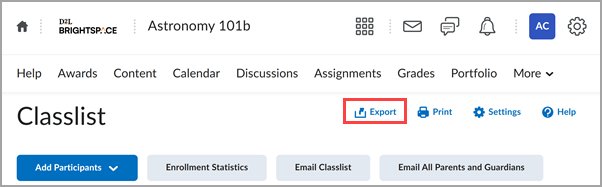
Figure: A new Export button appears on the Classlist page.
To allow for more control over access, this update includes two new permissions that control visibility of the Print and Export buttons in the Classlist:
- Classlist > Can Print Classlist (enabled by default for users who have the Classlist > Has Access to the Classlist permission enabled)
- Classlist > Can Export Classlist (disabled by default)
Course Updater – End of life for Course Updater tool | Removed
As of this release, the Courses tool fully replaces the Course Updater tool, which is no longer available. Administrators must navigate to Admin Tools > Courses and select Edit Status to update active or inactive statuses, or select Edit Dates to change start and end dates in bulk.
Previously, Administrators used the Course Updater tool to bulk update course statuses and dates.
The introduction of the Courses tool and the plan to end of life the Course Updater tool was first announced as in the Course Management – Enhanced workflow and user experience in test environments | New release note as part of the February 2025 / 20.25.02 release.
For more detailed information, please visit the D2L Brightspace Community – March 2026 Updates
** Not all features listed on the link are used with the BCIT Learning Hub