


- Resource
- How To - Instructors
- How to Change the Start or End Date of a Course
How to Change the Start or End Date of a Course
Sometimes the start or end date of a course needs to change. Students might need access to a course before the actual official start date or extensions might be required at the end of a course. Follow the steps below to change the course dates.
From the navigation bar in the course, go to Edit Course > under Site Setup > Course Offering Information

Under Start Date choose a new date and time and/or under End Date choose a new date and time > Save
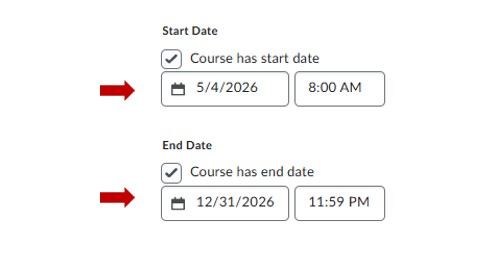
In the example above, the course is available to enter on May 4, 2026 at 8:00 AM and will be CLOSED on Dec 31, 2026 at 11:59 PM. Users trying to access before the start date and after the end date will be unable to access the course.
* Deselecting the boxes “Course has start date” and “End Date” makes the course open and available to enter by anyone listed in the classlist.
To make changes to a course without students accessing it, set the course end date to a past date (e.g., February 1, 2022). This allows students to see the course in their list but prevents them from entering it while you edit.
Related Posts
