


- Updates
- December 2023 Learning Hub updates
December 2023 Learning Hub updates
Assignments - Interface improvements for annotations | Updated
D2L is updating the Annotations tool in Assignments to be a web component, as part of our internal technical maintenance work. As a result, the user interface for the annotations viewer is improved to include the following changes:
- Error state includes updated dialog language.
- Document conversion state now has in-page messaging and a loading icon. Previously, there was a dialog displaying the messaging.
- General loading state now has a loading icon. Previously, there was no loading icon.
- Note annotations and their print format show annotations instead of just the annotations icon.

Figure: If an error occurs while loading the assignment file, an error dialog appears.

Figure: The document conversion state appears while the assignment file is loading.
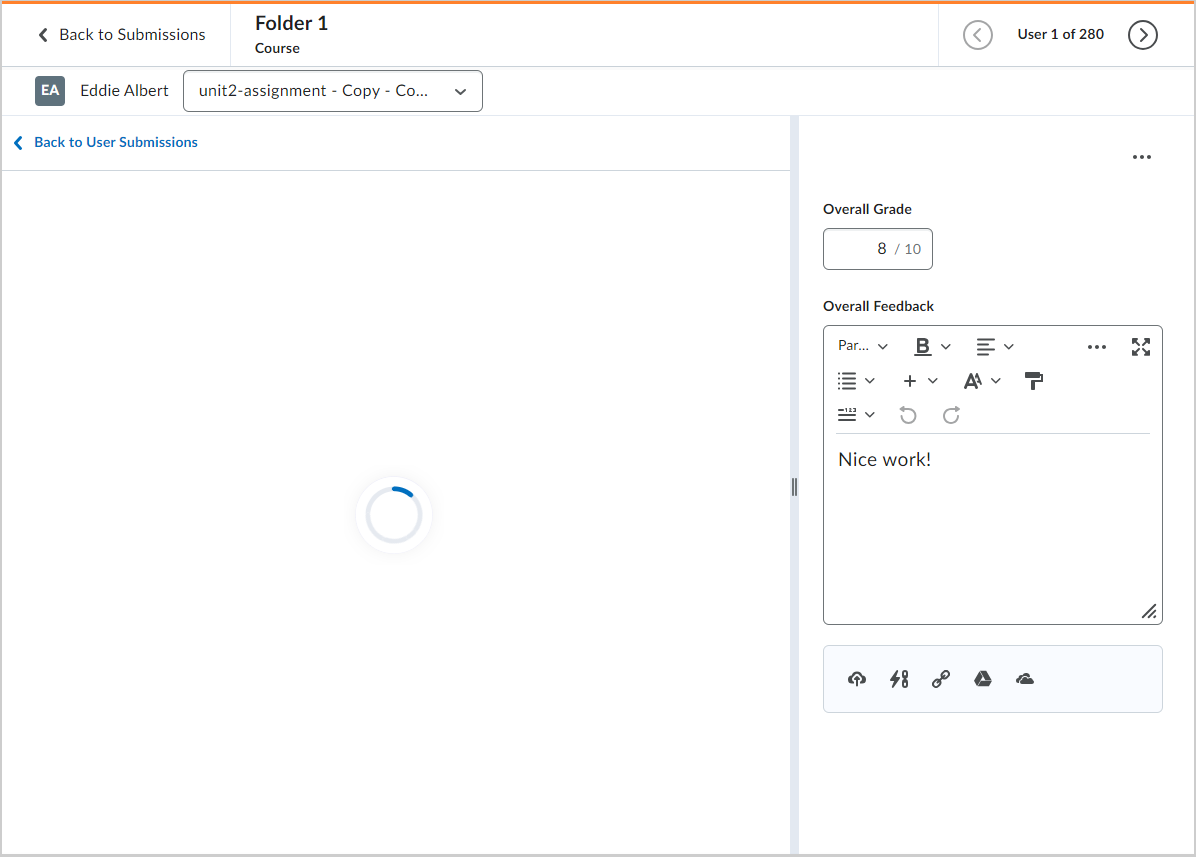
Figure: When an assignment file is loading, the loading icon appears.

Figure: If you print or convert an annotated file, the annotation appears on the page.
Technical Details
Impact:
- Slight impact to instructors due to the new messaging and icons being displayed in the Assignments tool’s Annotations interface.
Availability:
- This feature is available to all clients.
To enable:
- This functionality is automatically enabled for all users who have the annotations viewer enabled.
- This functionality is not dependent on any new or existing permissions.
- This functionality is not dependent on any new or existing configuration variables.
Assignments and Discussions – Feedback field limitations for evaluation experiences | Updated
The Assignments and Discussions tools’ evaluation feedback field is changing from a 500,000 character limitation to a 300,000 character limitation, resulting in an updated dialog warning appearing when the user hits 300,000 characters.
The character limit update improves performance and security for evaluations. Previously, when a user would enter over 300,000 characters, the new information may not have been saved. This potential save failure resulted in the loss of anything entered between 300,000-500,000 characters.

Figure: The warning message for character limitations appears when a user enters over 300,000 characters.
Technical Details
Impact:
- Slight impact to instructors who now see a dialog message when they exceed 300,000 characters.
Availability:
- This feature is available to all clients.
To enable:
- This functionality is automatically enabled for all users.
- This functionality is not dependent on any new or existing permissions.
- This functionality is not dependent on any new or existing configuration variables.
Calendar – View quiz start and quiz end dates as separate events in Calendar | New
When an instructor adds a Start Date and End Date in Quizzes and then selects Add Availability Dates to Calendar, both dates are displayed in the Calendar tool as separate events. Previously, only one event displayed showing when the availability of that quiz ended.

Figure: From Quizzes, instructors must enter a Start Date and End Date, and then select Add Availability Dates to Calendar.

Figure: Users can see when a quiz is available as a separate event item from when it ends.
This feature implements the following PIE items:
- D10060 (Consistency among Calendar Events (Start, Due, End Dates) for Quizzes and Assignments)
- D9956 (Add quiz start dates to calendar widget)
- D7273 (Add quiz start dates to calendar widget)
- D5688 (Post Assignment and Discussion End Dates in the Calendar and Upcoming Events)
Technical Details
Impact:
- Slight impact to instructors and learners due to the ability to see a new start date event in Calendar for all existing and newly created quizzes with start and end dates.
Availability:
- This feature is available to all clients.
To enable:
- This functionality is automatically enabled for all users.
- This functionality is not dependent on any new or existing permissions.
- This functionality is not dependent on any new or existing configuration variables.
Discussions – Administrators can choose forum workflow | Updated
With this release, administrators can now determine how users assign forums to topics in the New Discussion Topic Editing experience. This configuration variable enables administrators to choose either the existing streamlined behavior for assigning discussion topics to forums or an option to directly select a forum on the primary panel. The default setting for the configuration variable is the existing streamlined workflow.

Technical Details
Impact:
- Slight impact to administrators due to the ability to configure forum workflows in the New Discussion Topic Editing experience.
- Slight impact to instructors if the explicit forum selection option is enabled due to the introduction of a modified forum workflow.
Availability:
- This feature is available to all clients.
To enable:
- The streamlined forum workflow is enabled automatically. Administrators can enable the d2l.Tools.Discuss.CreateForumWorkflow configuration variable to allow for the explicit forum selection option.
- This functionality is not dependent on any new or existing permissions.
Quizzes - Identify bonus questions in a quiz | New
Quizzes now clearly mark bonus questions with Bonus, improving learner understanding and addressing a previous lack of indication in Quizzes.
 Figure: Learners completing a bonus question now see Bonus.
Technical Details
Impact:
- Slight impact to instructors due to the ability to clearly display bonus quiz questions for learners.
- Slight impact to learners due to the ability to clearly identify which questions are bonus questions in a quiz.
Availability:
- This feature is available to all clients.
To enable:
- This functionality is automatically enabled for all users.
- This functionality is not dependent on any new or existing permissions.
- This functionality is not dependent on any new or existing configuration variables.
Rubrics – Grades tool now uses Consistent Evaluation interface for assessments | Updated
When an evaluator assesses an assignment or discussion in the Grades tool, the rubric now uses the Consistent Evaluation interface whether there is work submitted for evaluation. This is consistent with the assessment experience for assignments or discussions in other areas of Brightspace.
Previously, evaluations for these types of activities used a pop-out Rubric grid when launching from the Grades tool. When users click the drop-down menu on the column header to enter grades, the rows with un-submitted work now use the Consistent Evaluation experience instead of the previous Rubric pop-out.
This feature addresses the following accessibility criteria:
- WCAG 2.1 Success Criterion 3.2.4 – Consistent Identification
 Figure: The Assessment column contains icons to indicate that there are evaluations available to complete.

Figure: The grade item (in this example, a discussion submission) appears with the rubric collapsed on the right. Click the arrow beside the rubric name to expand the rubric assessment area.
Technical Details
Impact:
- Slight impact to instructors due to the ability to assess assignments and discussions in the Grades tool using the Consistent Evaluation interface.
Availability:
- This feature is available to all clients.
To enable:
- This functionality is automatically enabled for all users.
- This functionality is not dependent on any new or existing permissions.
- This functionality is not dependent on any new or existing configuration variables.
For more detailed information, please visit the D2L Brightspace Community – December 2023 Updates
** Not all features listed on the link are used with the BCIT Learning Hub