


McGraw Hill – Overview
About
McGraw Hill is a leading educational publisher dedicated to supporting teaching and learning through innovative digital solutions. In partnership with BCIT McGraw Hill supports the Connect and SIMnet learning platforms which have both been integrated within the BCIT Learning Hub. These tools empower faculty to deliver personalized, data-driven instruction across disciplines—from foundational Microsoft Office skills to advanced adaptive learning in business, science, and humanities. Whether you’re enhancing digital literacy or enriching your course with interactive content, McGraw Hill provides flexible, scalable resources designed to meet the evolving needs of higher education
McGraw Hill Tools
| Feature / Use Case | McGraw Hill Connect | McGraw Hill SIMnet |
|---|---|---|
| Primary Focus | Comprehensive courseware for a wide range of disciplines | Microsoft Office and IT skills training & assessment |
| Content Type | Digital-first textbooks, SmartBook adaptive learning, assessments | Simulated Microsoft Office tasks, computer concepts, file management, generative AI |
| Target Courses | Business, sciences, humanities, social sciences, etc. | Computer applications, business tech, IT fundamentals |
| Adaptive Learning | Yes – SmartBook® uses learning science to personalize study paths | No adaptive learning; focuses on simulation-based skill development |
| Digital Credentials | Not applicable | Yes – digital badges issued for skill validation |
| Certification Prep | Not applicable | Includes prep for Microsoft Office Specialist (MOS) certification |
| Learning Hub Tool Syncronization | Content & Grades Tools | Content & Grades Tools |
| Student Engagement Tools | AI Reader, ReadAnywhere app, SmartBook assignments | SIMbooks with text-to-speech, interactive simulations |
| Instructor Tools | Analytics dashboard, course customization, remote proctoring | Customizable course policies, integrity checks, device-aware instructions |
| Accessibility & Inclusivity | Inclusive Access for first-day materials | SIMbooks support 30+ languages and accessibility features |
| Best Use Case | Faculty seeking a full digital course experience with adaptive learning | Faculty teaching digital literacy, Microsoft Office, or career readiness skills |
Accessing McGraw Hill
- Go to your Learning Hub course offering
- Select Content from the navigation bar

- Create a module or click on an already existing module
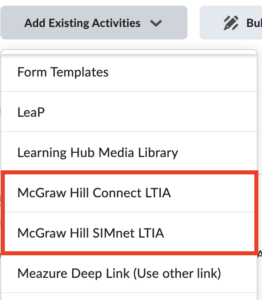
- Click Add Existing Activities

- Select either McGraw Hill LTIA Connect or McGraw Hill LTIA SIMnet
How to setup McGraw Hill
Instructions for SIMnet – (Coming soon, please contact your representative in the meantime)
Not sure who your representative is?
Considerations when using McGraw Hill Connect
McGraw Hill Resources
Support with McGraw Hill
If you have any questions or problems with McGraw Hill please reach out either to your McGraw Hill representative directly or contact McGraw Hill support at
Phone:
1-(800) 331-5094
Hours of Operation:
Sunday: 12:00 PM to 12:00 AM EST
Monday-Thursday: 24 hrs
Friday: 12:00 AM to 9:00 PM EST
Saturday: 10:00 AM to 8:00 PM EST