


- Resource
- Quiz - Instructor
- Quizzes – Single Session Restriction
Quizzes – Single Session Restriction
Instructors can now require learners to complete a quiz within a single Learning Hub login session, helping maintain academic integrity. When this setting is enabled, learners cannot resume the quiz using another browser session.
For instance, if a learner starts a quiz on a laptop, they cannot switch to another device to continue. Likewise, if another person tries to access the quiz using the learner’s credentials, the system will prevent them from doing so.
When this configuration variable is enabled, instructors can navigate to the Availability Dates & Conditions section while creating or editing a quiz and select Lock each attempt to a single login session.

Note: This setting only restricts access to the quiz. It does not prevent learners from having multiple active sessions in Brightspace.
After enabling the Session Restrictions option and saving the quiz, a key icon will appear on the Quizzes page, indicating that the restriction is active.

If the student—or anyone else—attempts to access a quiz that is already in progress from a different browser or computer, the message shown below will appear, preventing them from entering the quiz.

How to Reset a Quiz
If a student is logged out during a quiz attempt, they won’t be able to resume until you reset the session restriction for that attempt.
Select Activities > Quizzes > select the dropdown beside the quiz > Grade >
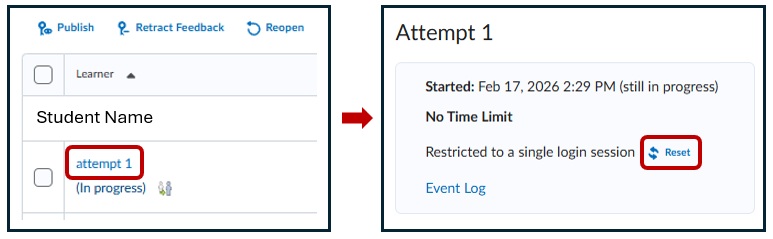
Locate the student > select Attempt 1 > Reset
Then select the Reset Restriction option. A notification appears indicating that the session has been reset
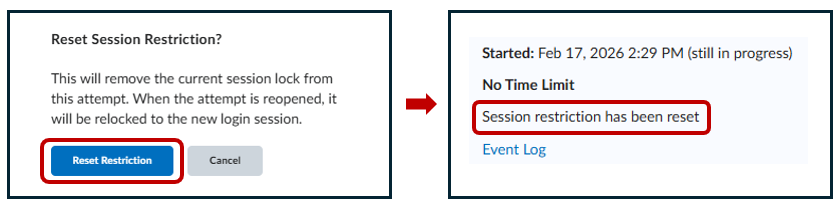
The instructor should then inform the student to refresh their browser screen, after which the student can click the “Continue Quiz…” button to resume the attempt.
Quizzes – How to Submit an Exam on Behalf of a Student (In Progress)
Quizzes – Reopen a submitted quiz attempt
Related Posts
