


- Resource
- How To - Student
- Guided Tour of the Learning Hub
Guided Tour of the Learning Hub
New to the Learning Hub? This self-paced online course gives you a quick overview of how BCIT’s Learning Hub works and introduces you to the most common tools you’ll use in your courses.
✅ Learn how to navigate your online classes
✅ Get familiar with key features and tools
✅ Build confidence using the Learning Hub
To get started
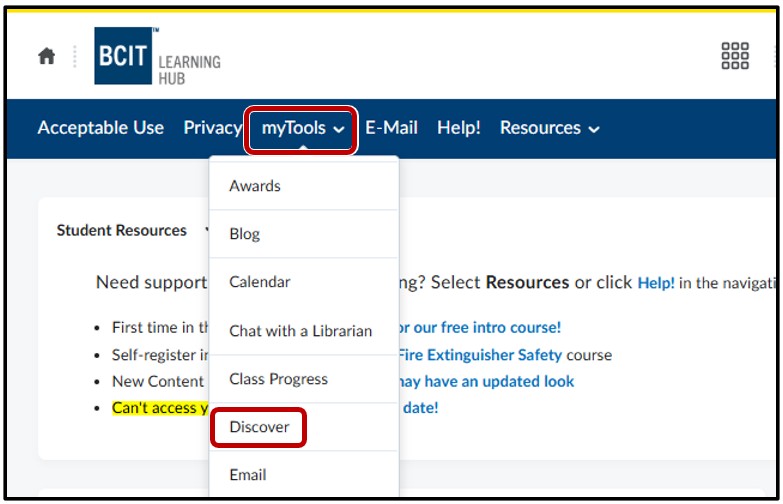
Use the Discover tool in the Learning Hub. Go to myTools > Discover
Locate the course by using the search bar, selecting Browse All Content or by selecting View All (i.e. The Learning Hub – A Guided Tour for BCIT Students). Once located, click on the course title

Click the Enroll in Course button

A popup will show a successful enrollment message> OK > select Open Course

Video tutorial on how to self enroll into a course
Find the Course Under "My Courses"
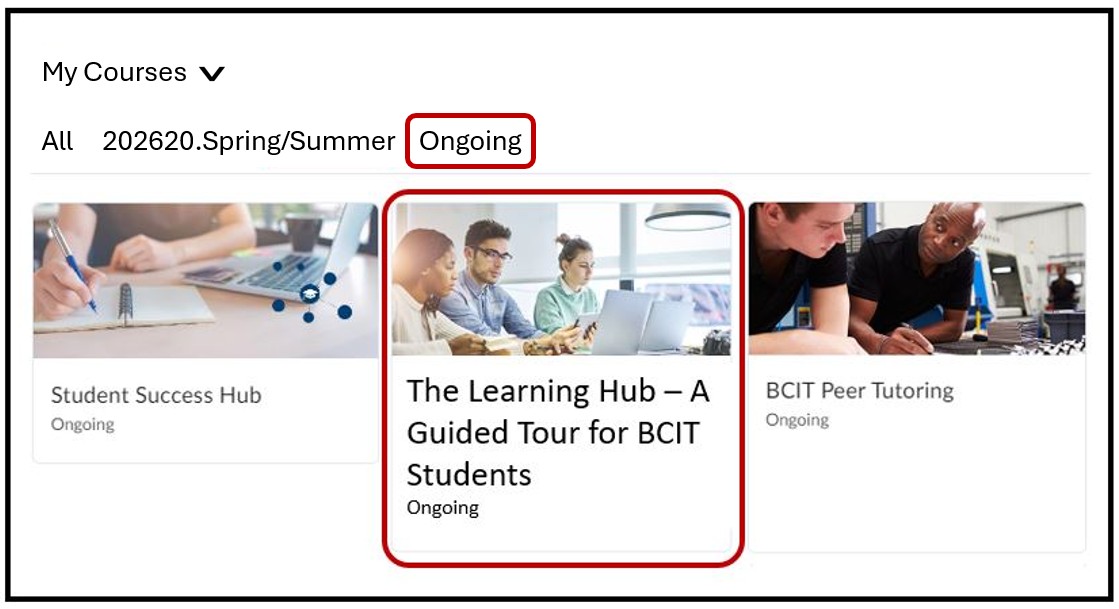
Log into the Learning Hub > scroll down to My Courses > Ongoing > locate the course labeled, Guided Tour for BCIT Students Click on it to enter into the course.
Related Posts
