


- Resource
- Uncategorized
- Kaltura My Media – Metadata
Kaltura My Media – Metadata
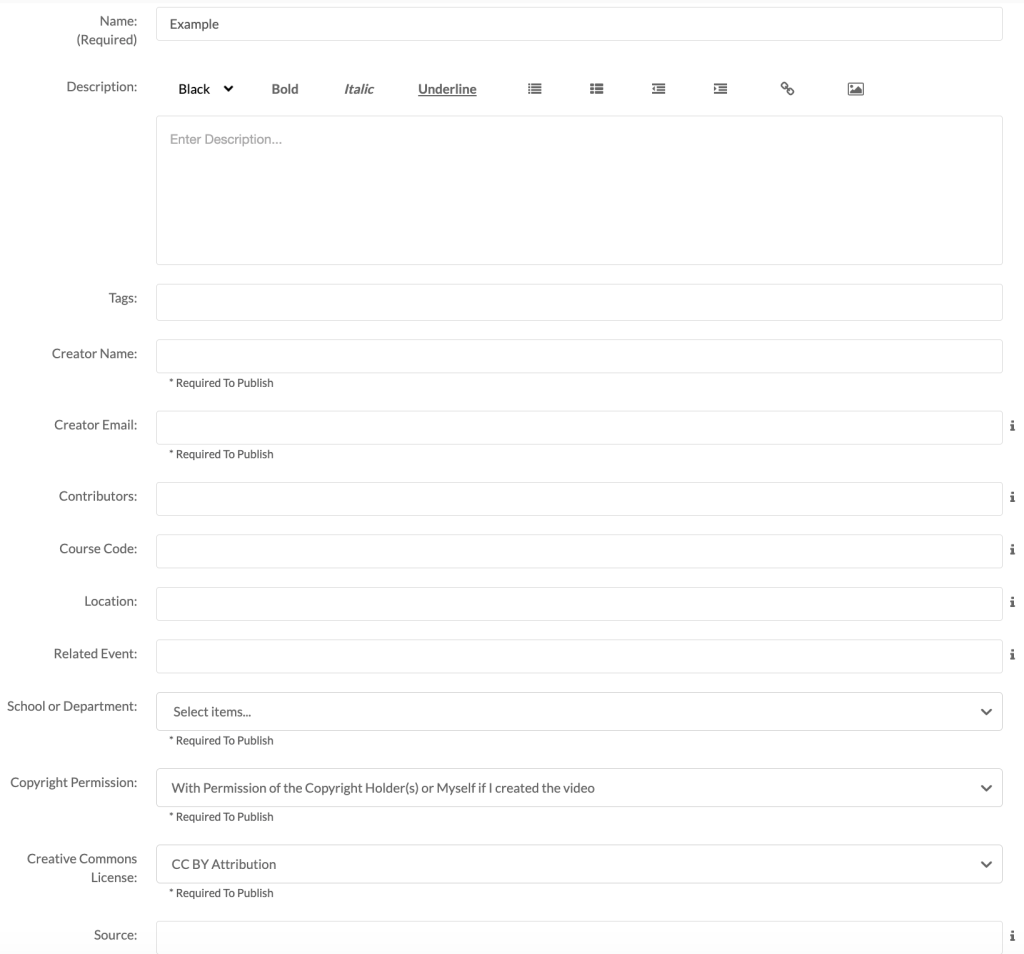
Anytime an entry in Kaltura is created all its required metadata fields must be completed before that entry can be published into any course in the Learning Hub. If required metadata is missing from an entry, then that entry cannot be published, nor can it be embedded outside of My Media.
The required metadata fields for Kaltura entries are:
- Name
- Creator Name
- Creator Email
- School or Department
- Copyright Permissions
- Creative Commons License
- Disclaimer (if applicable)
Editing Metadata & Resolving publish errors
If you are unable to publish an entry in your course, it is likely missing one or more of these fields. Below are common examples of what this problem might look like for the following Kaltura tools:
Kaltura Browse and Embed (BSE)

Kaltura Media Gallery

Kaltura My Media

To fix these issues you will have to complete all required metadata for each specific entry. To begin, open My Media, locate the entry, select Edit.

Under the Details tab complete the missing required fields and then click Save


After saving, return to My Media. You should now see that the entry is in a publishable state and you can share it outside of My Media.
Related Posts
